
Compliance · reviewed November 2026
What SecondEye does on your PC
Windows draws the copy, and SecondEye puts it where you want. Here is exactly how it works, checked against the app's code.
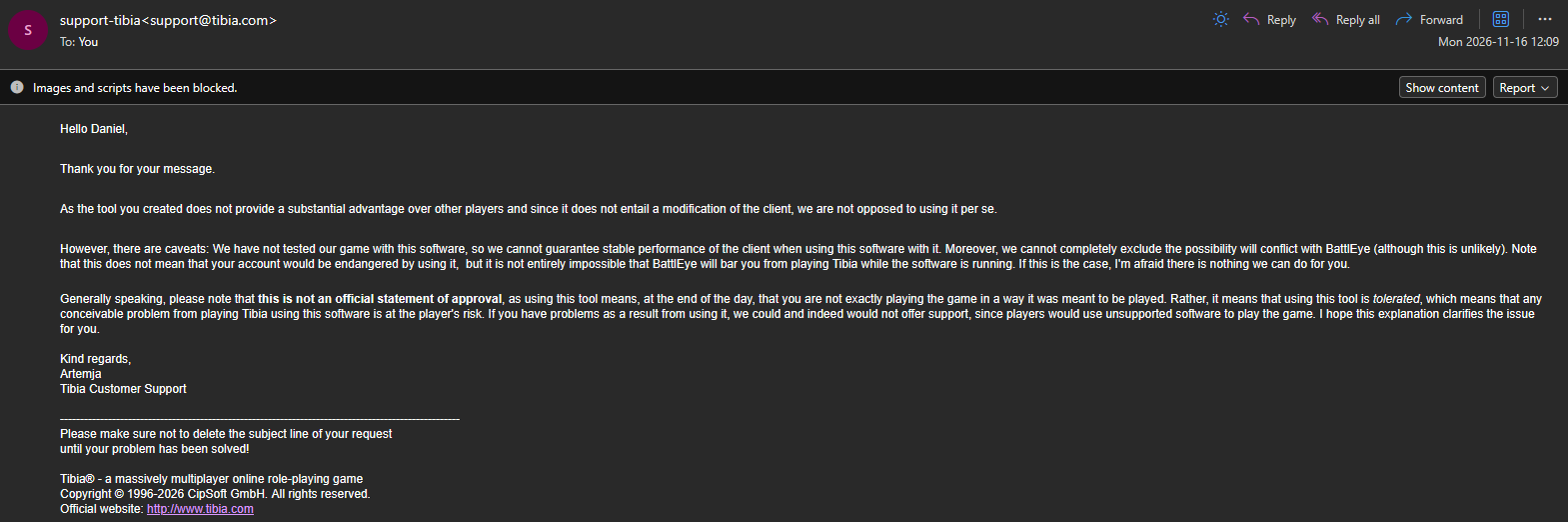
CipSoft support is not opposed to SecondEye: no substantial advantage, no change to the client and no risk to your account. Both servers' full replies are at the end of this page.
Windows draws every copy
Windows already keeps a picture of every open window, the one you see in the taskbar preview. SecondEye asks Windows to show a piece of that picture in a window of its own.
- 01 Game client Tibia, RubinOT or OTClient draws its window as usual.
- window picture
- 02 Windows (DWM) The Desktop Window Manager puts together everything on screen and draws the thumbnail.
- thumbnail
- 03 SecondEye windows A separate program. It picks the area, the size and the place on screen.
- Game and SecondEye stay separate
How SecondEye works, check by check
Anti-cheat systems such as BattlEye look at what programs do with the game. Each point sits next to how SecondEye does it, and automated tests on the app's code check every item in this table.
| Technical point | How SecondEye does it |
|---|---|
| Reading memory or pixels | Uses the Windows thumbnail. The copy is a DwmRegisterThumbnail thumbnail: Windows draws it straight on screen, so SecondEye never handles the game's memory or pixels. |
| DLL or code injection | Runs as its own program. SecondEye.exe is a separate process. The code has no CreateRemoteThread, WriteProcessMemory or LoadLibrary. |
| API hooks | Calls Windows' public functions. Exactly as Windows offers them, with no SetWindowsHookEx and no patched functions. |
| Automated keys and clicks | Listens for your shortcut. Registered with RegisterHotKey. Every other key goes to the game as usual, and in Hunt mode clicks pass through the overlays. |
| Game files | Keeps to its own files. Settings and installation live in your user folder, and the game's files stay as they are. |
| Game network traffic | Talks to the SecondEye server. For your account and updates. While a game is the main window, it also tells which game, the character shown in the window title, the app version and whether Hunt is on, so your account keeps a record of the days you play with SecondEye. Other windows are never sent. The game's connection stays between you and the game server. |
| Access to the game process | Reads the program's name and path. To find the game window it reads the window title and class and, when needed, the program's path through PROCESS_QUERY_LIMITED_INFORMATION, the access Task Manager uses. That access can't read memory. |
In short
SecondEye is a separate program that shows a copy of what is already on your screen, drawn by Windows like the taskbar preview. You play, and SecondEye keeps your slots and timers in sight.
The full replies from CipSoft and RubinOT are below, word for word.
Questions
OBS shows graphics-hook64.dll inside SecondEye. Why?
That DLL is part of OBS. When a Game Capture source points at SecondEye, OBS injects graphics-hook64.dll into it to grab the image. Capture SecondEye with Window Capture instead, and OBS stops injecting it. While the DLL is loaded, it can also hold up a SecondEye update until you close OBS.
Why does SecondEye look at the game's program name?
To tell Tibia, RubinOT and OTClient windows apart from the rest. The program's name and path are all it needs. With Show all windows on, the list also shows the titles of your other open windows, like Alt+Tab, and none of it leaves your PC. It only mirrors the windows you pick, with the same Windows thumbnail it uses for the game.
Where does the timer shortcut go?
To SecondEye. Windows tells SecondEye when you press the shortcut you chose, and every other key goes to the game as usual.
The servers' replies
Read CipSoft's reply
As the tool you created does not provide a substantial advantage over other players and since it does not entail a modification of the client, we are not opposed to using it per se.
However, there are caveats: We have not tested our game with this software, so we cannot guarantee stable performance of the client when using this software with it. Moreover, we cannot completely exclude the possibility will conflict with BattlEye (although this is unlikely). Note that this does not mean that your account would be endangered by using it, but it is not entirely impossible that BattlEye will bar you from playing Tibia while the software is running. If this is the case, I'm afraid there is nothing we can do for you.
Generally speaking, please note that this is not an official statement of approval, as using this tool means, at the end of the day, that you are not exactly playing the game in a way it was meant to be played. Rather, it means that using this tool is tolerated, which means that any conceivable problem from playing Tibia using this software is at the player's risk. If you have problems as a result from using it, we could and indeed would not offer support, since players would use unsupported software to play the game. I hope this explanation clarifies the issue for you.
Tibia Customer Support
Read RubinOT's reply
No momento, não validamos, autorizamos ou recomendamos ferramentas externas utilizadas em conjunto com o RTC, mesmo que a ferramenta não altere diretamente o cliente ou não execute ações dentro dele.
Por esse motivo, também não conseguimos confirmar previamente se uma ferramenta específica será considerada permitida pelo sistema de segurança.
Nossa recomendação é não utilizar ferramentas desse tipo em conjunto com o RTC. Caso o sistema de proteção identifique alguma ferramenta e seja aplicada uma punição à conta, não realizaremos a reversão da penalidade.
Suporte RubinOT
Official rules: Tibia rule 3b · RubinOT rules